
Email Bomb Events API
Overview
The Email Bomb Events API allows customers to retrieve reporting data on email bomb attacks - a technique where a target's inbox is flooded with a high volume of emails (often via mass newsletter/subscription sign-ups) in order to bury important messages, such as fraud alerts or one-time passcodes, and distract the victim while other malicious activity takes place.
This endpoint returns a list of users within your organization who have been targeted by mail bomb activity during a specified time range, along with the total count of matching events and pagination metadata to support retrieving large result sets in batches.
Base URL: https://threatprotection-api.proofpoint.com
Endpoint path: /api/v1/dash/reports/mail-bomb-events
Authentication: Bearer token.
Getting Started
Follow these steps to make your first API call to the Dash Reports API:
Step 1: Obtain API Credentials
- Credentials are provisioned through Cloud Admin UI (Threat Protection Page) > Settings > API Key Management > Threat Protection tab (generate and manage keys).
- Navigate to the API Key Management section and click + Create New to generate a new API key and secret for the Threat Protection API.
Step 2: Generate Authentication Token
Use the key and secret generated from the Admin Portal (See API Key Management) to generate an authentication token. The token is valid for 1 hour.
Example request with curl:

Example JSON response:

Using the Token:

Rate Limits: Customer Guide
The API has rate limiting to ensure fair usage and system stability.
When there's an HTTP 429 (Too Many Requests)
You'll receive a 429 error if you exceed any of these limits:
- More than 10 requests per minute per API key. Each API key is counted separately. (Shared across the other Reports endpoints too)
-
More than 100 requests per day per customer. This limit is shared across all API keys in your organization. Creating more API keys does not raise it. For example, if Key A makes 60 calls and Key B makes 40 calls in the same day, both keys get 429 responses until the daily window resets. Client should wait and retry after the window resets when it gets a 429.
GET: / mail-bomb-events
Retrieves paginated email bomb (mail bomb) events for a customer. Returns a list of users who have been targeted by email bomb attacks within the given time range, along with the total event count and pagination metadata.
Required Parameters

Optional Parameters
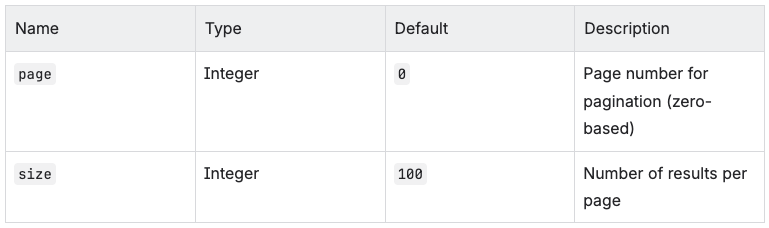
Time Constraints
-
Maximum date range: 90 days between start and end
-
Maximum lookback: 365 days: start cannot be more than 365 days in the past
Validations and Error Messages

Sample 200 Response

Response Fields
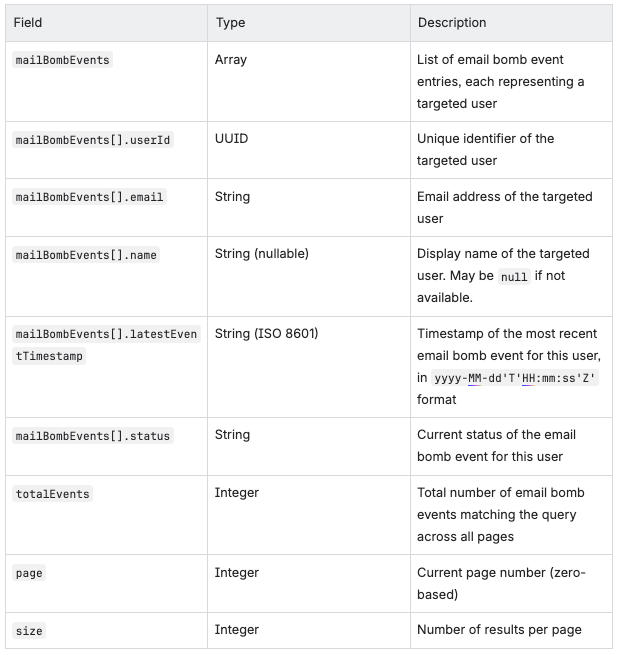
Example
curl -X GET "https://threatprotection-api.proofpo...age=0&size=100" Authorization: Bearer YOUR_TOKEN"
Notes
-
Rate limiting :
-
The per-minute limit (10 requests/minute) applies to each API key.
-
The daily limit (100 requests/day) applies per customer and is shared across all API keys. It is not a separate limit for each key.
-
-
The
namefield is nullable — it will benullwhen the user's display name is not available in the system. -
Pagination is zero-based. The first page is
page=0.